Every other post in this series is a step in a ladder. This one is not. It is a map.
You can land here cold, read it in one sitting, and walk away knowing the shape of the whole subject: what a large language model (LLM) is, how it got that way, what you control when you use one, how to pick one, and how to tell whether its output is any good. Then you can decide which parts you want to go deep on.
Nothing here needs machine learning background. If you have written some Python and taken a data structures course, you have enough.
Why it exists
Most people meet an LLM as a chat box. You type, it answers, and that is the whole mental model.
That model is enough to use ChatGPT. It is not enough to build with one. The moment you are responsible for a feature that calls an LLM, you start getting questions you cannot answer from the chat box view. Why did it make that fact up? Why did the same prompt work yesterday? Why is this costing so much? Which model should we use? Is the new prompt actually better, or does it only feel better?
Every one of those questions has a concrete answer. The answers live in different places though, and the guides tend to be either a research paper or a tutorial that stops at “print the response”. So people end up with a chat box model of the world and a production system they cannot debug.
This post is the missing middle. Seven parts, each one the shortest honest version of a topic that has its own post later in the series.
Intuition
Here is the analogy the whole post hangs on.
An LLM is a new graduate who has read the entire internet and has never held a job.
That one sentence carries a surprising amount of weight. Reading the whole internet gives you enormous knowledge and zero sense of what anyone actually wants from you. So the model goes through the same arc a new hire does.
First it reads everything. Then somebody sits with it and shows what a good answer looks like. Then it gets feedback: this answer was better than that one. And every morning after that, someone hands it a ticket describing the task.

The analogy keeps paying off later. The context window is how much this person can hold in their head at once. A hallucination is them being too eager to please to admit they do not know. An eval is their actual performance review, run on real tickets rather than on vibes.
Keep the new hire in mind. Every part below is one more thing about them.
Part 1 - How LLMs got here
For most of machine learning’s history, if you wanted a model that detected spam, you built a spam model. If you also wanted translation, you built a second model, with its own architecture, its own labelled dataset, and its own team. Every task was a separate project.
Then the 2017 Transformer paper introduced an architecture with two halves, and the field spent the next few years arguing about which half to keep.
Three ways to use a transformer
An encoder is the reading half. It takes the whole input at once, looks at every word in both directions, and produces a numeric representation of the meaning. BERT is the famous one. Encoders are excellent at understanding tasks: is this spam, what is the sentiment, which of these documents matches my search. They cannot write text, because they were never built to produce one word after another.
A decoder is the writing half. It produces one token at a time. A token is a chunk of text the model treats as a single unit, usually a common word or a piece of a longer one, the same way a compiler’s lexer breaks source code into symbols rather than characters. “unhappiness” might arrive as three tokens. A useful rule of thumb for English is that a token averages about four characters.
At each step, the decoder can only see the tokens that came before it, never the ones that come after. GPT is the famous one. That backward-looking restriction sounds like a weakness. It turned out to be the whole point.
An encoder-decoder keeps both: read the input fully, then write the output. T5 and BART work this way. This is a natural fit for translation and summarisation, where you have a clear input document and a clear output document. The catch is that you still need paired training data for every task you care about.

Why decoder-only won
Decoder-only won, and the reason is worth sitting with, because it explains most of what LLMs are like today.
Every task can be rewritten as text in, text out. Translation becomes “Translate to French: …” followed by French text. Classification becomes “Is this spam? Answer yes or no” followed by a yes. Summarisation becomes a document followed by the word “Summary:” and then a summary. If every task has the same shape, you do not need a task-specific architecture. You need one model that is very good at continuing text.
That gives you a single training objective, predict the next token, and one architecture to optimise. All the engineering effort compounds into one model instead of splitting three ways. It is the same argument as replacing a directory of single-purpose scripts with one well-designed library.
Autoregressive: the loop that feeds itself
The way a decoder generates is called autoregressive: it predicts one token, appends that token to its own input, and predicts again.
tokens = prompt
while not done:
    next_token = model(tokens)   # one token, based on everything so far
    tokens = tokens + next_token
It is a loop that feeds its own output back in, like a REPL piping its stdout into its stdin. This is also why LLM responses arrive word by word rather than all at once. There is no finished answer sitting somewhere waiting to be sent. The model is genuinely making it up one token at a time.
Task-agnostic, and following instructions
Two consequences of this design have names, and both come up constantly.
A model is task-agnostic when it can do a task nobody trained it on. Nobody ever trained a “summarise” task into a base LLM. Summarising is what plausible text after the word “Summary:” happens to look like. That is why one model handles thousands of tasks with zero additional training, and why “what can it do?” turns out to be a question about prompts rather than a question about the model.
Instruction following is the ability to respond to a request instead of continuing it. This one surprises people. A raw pre-trained model is a text completer, not an assistant. Ask a base model “What is the capital of France?” and a very reasonable continuation is another three quiz questions, because that is what text following a quiz question usually looks like on the internet. Getting an answer instead of a continuation takes an extra training stage, which is Part 2.
Scaling laws
Scaling laws are the empirical finding that the model’s error falls in a smooth, predictable curve as you add parameters, data, and compute. Not a vague “bigger is better” but an actual formula you can fit on small runs and extrapolate.
The commercial importance is hard to overstate. Scaling laws are what let a company forecast the gain from a hundred-million-dollar training run before spending the money. It is capacity planning: measure small, extrapolate, then buy the hardware.
The 2022 Chinchilla work added the correction that mattered most in practice. For a fixed compute budget there is an optimal split between model size and training data, and the giant models of the time were on the wrong side of it. They were too big and trained on too little text. A smaller model fed far more data beat them.
Two honest caveats, because scaling laws get quoted as more than they are. They predict loss, the model’s error at predicting the next token. Loss is not the same thing as capability, and the jump from one to the other is still not well understood. And model size is no longer the only axis that matters: post-training and how much computation the model spends at answer time are now levers of their own.
Covered properly in: Section 2 (Transformers), 2.6, 2.7, and 4.1.
Part 2 - How a chat model gets trained
A chat model is built in three stages. The most useful thing to notice is that the training data changes shape at each stage. That change in shape is what each stage is actually buying you.

Stage 1: pre-training
The model reads trillions of tokens of web pages, code, and books, and does one thing: predict the next token. Get it wrong, adjust the weights, repeat.
The data is raw text with no labels at all:
The Kolkata Metro opened in 1984 and was the first underground
railway system built in India. It runs mostly north to south...
There is no annotation there, and that is the entire trick. The label for each position is the word that actually comes next, which is already in the text. Nobody has to label anything. This is why pre-training can consume trillions of tokens when a hand-labelled dataset tops out in the millions. It is a test suite that generates its own expected values from the input.
The cost is enormous: thousands of GPUs, weeks to months, and the kind of budget that gets announced in press releases. Almost nobody reading this will run one, which is fine. You will use the output of somebody else’s.
What you get is a base model. It knows language, and it has absorbed a large amount of world knowledge, and it behaves like an extremely good autocomplete. It is not something you would put in front of a user.
Stage 2: SFT
Supervised Fine-Tuning (SFT) is the stage that turns a text completer into something that answers. The data is now pairs of a prompt and the ideal response to it, written by humans:
{
  "prompt": "Explain what a database index is, in two sentences.",
  "response": "An index is a separate lookup structure that maps column values to row locations. It makes reads on that column much faster, at the cost of extra storage and slower writes."
}
Two things to notice. The volume dropped from trillions of tokens to tens of thousands of examples, because a human writes each one. And the training objective did not change at all: it is still next-token prediction. The difference is that the loss is only scored on the response part, not the prompt. The model is being taught to produce that text after that request.
So SFT buys behaviour and format, not knowledge. The facts came from pre-training. What SFT adds is the habit of answering the question, keeping a sensible length, and formatting the reply like a helpful response rather than like the next paragraph of a web page.
This is the stage that is actually within reach for a normal team. Days rather than months, a handful of GPUs, and a dataset you can write yourself. When people say they “fine-tuned a model”, this is usually what they did.
Stage 3: alignment
SFT can teach the model one good answer. It cannot teach the model that one answer is better than another, because the training data only ever contains the good one.
That matters more than it sounds. Most of what makes a chat model pleasant to use is comparative judgement: this phrasing is clearer, this length is right, this refusal was appropriate, this answer hedged too much. You cannot write that down as a single target response.
So the data changes shape again. Instead of an ideal answer, you collect preferences:
{
  "prompt": "My deployment failed with an OOM error. What do I do?",
  "response_a": "You should check your memory settings and adjust them.",
  "response_b": "An OOM (out of memory) error means the container asked for more memory than its limit. Check the limit in your deployment config first, then look at whether usage actually grew or the limit was always too low.",
  "preferred": "b"
}
Nobody wrote the perfect answer here. A human read two answers and picked one. That asymmetry is the key insight of this whole stage: ranking two things is far easier and faster for a human than authoring the ideal thing. You can get a lot more data per hour of human attention.
There are three names you will hear for what happens next.
RLHF (Reinforcement Learning from Human Feedback) is the original recipe, and it has two steps. First you train a separate model, the reward model, on all those preference pairs. Its only job is to look at a response and output a score predicting how much a human would like it. Then you use reinforcement learning, usually an algorithm called PPO (Proximal Policy Optimization), to nudge the LLM toward responses the reward model scores highly. A penalty term keeps it from drifting too far from where SFT left it, because a model optimising a score with no anchor will find degenerate ways to score well.
The reward model is worth a second look, because it is a genuinely nice piece of engineering. You wanted a rule for “is this a good answer” and you could not write one down. So you trained a scorer from examples instead. It is a learned linter.
DPO (Direct Preference Optimization) skips the reward model entirely and optimises the LLM directly on the preference pairs with a plain loss function. Fewer moving parts, no RL loop, much easier to get working. It has become the default for most teams.
RLAIF (Reinforcement Learning from AI Feedback), and the closely related Constitutional AI, replaces the human labeller with another model applying a written set of rules. Since the bottleneck in the whole stage is human attention, that is what unlocks scale.
The three stages side by side
Put the three stages next to each other and the shape of the thing is clear:
| Stage | What the data looks like | Rough size | What it buys |
|---|---|---|---|
| Pre-training | raw text, no labels | trillions of tokens | language and facts |
| SFT | (prompt, ideal answer) | tens of thousands | answers instead of continues |
| Alignment | (prompt, A, B, which is better) | tens of thousands | tone, judgement, refusals |
CS degree, then onboarding, then performance reviews.
Covered properly in: Sections 4 and 5 (4.1, 4.2, 5.1, 5.2, 5.3).
Part 3 - Prompts
Why the prompt is the only lever you have
Here is the fact that makes prompts matter.
Once training is finished, the weights are frozen. They do not change when you use the model. They do not learn from your conversation. At runtime, the input is the only thing you control.
That is the whole reason prompt engineering is a real activity rather than superstition. The prompt is the program and the model is the interpreter. You cannot recompile the interpreter, so everything you want has to go in the arguments.
The roles
When you call a chat model you do not send a string, you send a list of messages with roles. There are three you will meet.
The system message holds your standing instructions. Who the model is, what rules it follows, what format the output takes. You set this as the developer and it stays the same across the conversation.
The user message is what the person typed this turn.
The assistant message is the model’s own previous reply. You send those back too.
messages = [
    {"role": "system", "content": "You are a support triage assistant. Reply with one word: billing, delivery, account, or other."},
    {"role": "user", "content": "My card got charged twice."},
]
The roles are not decoration and they are not a wrapper your library invented. During SFT the model was trained on a specific chat template with these roles marked by special tokens. Putting an instruction in the system message really does land differently from putting the same words in the user message, because the model learned during training that system content is the standing instruction.
Now the part that catches almost everyone.
The model is stateless. It remembers nothing between calls. When a chatbot
appears to remember what you said five messages ago, what is actually happening
is that the application resends the entire conversation on every single request.
“Memory” is a for loop over a list you are keeping. It is HTTP plus a cookie:
the server itself remembers nothing.
That single fact explains a lot of otherwise confusing behaviour. Long conversations get more expensive as they go, because you are resending more text each turn. They also eventually hit a wall, which is Part 4.
It also sets up a security question. The system message is yours. The user message is untrusted input from the internet. If you build a prompt by concatenating your instructions with text a user supplied, you have built the same class of vulnerability as string-concatenating SQL. A user who writes “ignore your previous instructions and …” is attempting prompt injection, and it works more often than you would like. Part 6 is where the defences go.
Writing a prompt that works
Every rule below has a reason attached. Prompting folklore without reasons is how people end up adding “you are a world-class expert” to everything and wondering why nothing improved.
Say what you want, not what you do not want. “Reply in under 50 words” gives the model a target. “Don’t be verbose” gives it a direction with no destination.
Name the output format explicitly, and name the allowed values. Not “return the category” but “return one of: billing, delivery, account, other”. The difference is worth a large number of percentage points, and we measure exactly that in the code section.
Separate instructions from data. Put the document the model should work on inside delimiters, and say which part is which. This helps the model and it is also your first line of defence against injection, because instructions buried in the data are now visibly in the data section.
Summarise the ticket below in one sentence.
Only use information from inside the tags.

<ticket>
{ticket_text}
</ticket>
Show examples when the format is easier to show than to describe. More on this in Part 4.
Give the model a way out. Add “if the text does not say, answer unknown”. This is the single highest-value line you can add to a factual prompt, and Part 6 explains why.
Put the stable content first and the changing content last. This one looks like style and is actually money. Part 4 explains.
One prompt, one job. A prompt that classifies, summarises, and drafts a reply will do all three worse than three prompts would. Same reason you split a 400-line function.
Concretely, here is a prompt that will disappoint you:
You are a helpful assistant. Look at this customer message and tell
me what it's about and how urgent and whether they want money back.
Don't make anything up. Message: {text}
And the same intent, rewritten:
Classify the support ticket inside the tags.

Return only a JSON object with exactly these keys:
  "category":          one of "billing", "delivery", "account", "other"
  "urgency":           one of "low", "medium", "high"
  "refund_requested":  true or false

Base every field only on the ticket text. If the ticket does not
indicate urgency, use "low". Return no prose, no code fences.

<ticket>
{text}
</ticket>
The second one is longer, and length is not the point. The point is that every field now has a closed set of legal answers, there is a stated default for the ambiguous case, and the output is something a program can check. That last part is what makes Part 7 possible at all.
Prompt versioning and management
A prompt is a small piece of text that silently changes the behaviour of your production system. That is the same risk profile as a database migration, so it deserves the same care.
In practice that means a few habits.
Keep prompts in files, not in string literals scattered through the code. One directory, one file per prompt, so you can see all of them and diff them.
prompts/
  ticket_triage/
    v1.txt
    v2.txt
    v3.txt        # current
  summarise_thread/
    v1.txt
Separate the template from the variables. The template is versioned. The variables are runtime data. Mixing them makes both harder to reason about.
Log which prompt version produced which output. When someone reports a bad answer next week, the first question is which prompt version they hit. Without that field in your logs you cannot answer it.
PROMPT_VERSION = "v3"   # bump on every behaviour change, log it with the output

def load_prompt(name: str, version: str) -> str:
    # read from disk once at startup, not per request
    return (PROMPTS_DIR / name / f"{version}.txt").read_text()

template = load_prompt("ticket_triage", PROMPT_VERSION)
prompt = template.format(text=ticket_text)
Never change a prompt without running your eval. This is the rule that makes the rest of it worth anything, and Part 7 is about building that eval.
You will also see hosted prompt management tools, which store prompts outside your repository so that non-engineers can edit them without a deploy. That is a real benefit for teams where a domain expert owns the wording. The tradeoff is that you give up “it is in git and it went through review”, so if you go that way you have to put the review and the eval gate back in the tool.
Covered properly in: 7.1 and 11.1.
Part 4 - Working inside the context window
The context window
The context window is the maximum number of tokens the model can consider in one call. Input and output together.
It is RAM, not disk. Fast, limited, and not where you keep everything.
Everything competes for that budget: the system prompt, the entire conversation history, any documents you retrieved, your examples, your tool definitions, and the answer the model has yet to write. Go over the limit and the call fails or gets silently truncated, neither of which is fun to debug in production.

Two things to know that the marketing numbers do not tell you.
Advertised is not effective. A model sold with a one-million-token window does technically accept a million tokens. Quality on retrieving specific facts from the middle of that window degrades a long way before the stated maximum. Published long-context evaluations tend to put usable context somewhere around half to four-fifths of the advertised number, depending on the model and the task. Benchmarks like RULER and LongBench exist to measure this separately for exactly that reason.
Long context is slow and expensive. You pay per input token, and attention cost grows faster than linearly with length. Stuffing an entire document set into every call is usually the wrong answer. Retrieving the three relevant paragraphs is cheaper, faster, and often more accurate. That tradeoff is what Section 8 on retrieval is about.
Zero-shot and few-shot
Zero-shot means you describe the task and ask, with no examples.
Few-shot means you include a handful of worked examples in the prompt first.
Classify the ticket. Return one of: billing, delivery, account, other.

Ticket: "I was charged twice for one order."
Category: billing

Ticket: "The driver never arrived."
Category: delivery

Ticket: "Password reset email never comes through."
Category:
The model has not learned anything here. Nothing was trained, no weights moved. It is pattern-matching the shape of the text in front of it, and the examples make the pattern unambiguous. Sometimes you will see this called in-context learning, which is a slightly unfortunate name, because no learning in the training sense is happening.
Few-shot wins when the format is easier to show than to describe. Edge cases, house style, an unusual output shape, a label set with fuzzy boundaries. Show three examples and you are done arguing with prose.
The cost is that those examples are in the prompt on every single call, forever. They are a fixture file you pay to load on every request. If you find yourself at twenty examples, that is the signal to look at fine-tuning instead, because at that point you are paying rent on training data.
Start zero-shot. Add examples when your eval shows you need them. Prefer examples that cover the cases you get wrong, not the cases you already get right.
A word about “prompt tuning”
This phrase means two different things and the collision causes real confusion.
Casually, people say “prompt tuning” when they mean sitting down and iterating on the wording. That is prompt engineering, and it is what Part 3 covered.
Technically, prompt tuning (also called soft prompts, and closely related to prefix tuning) is a training method. You freeze the entire model and learn a small set of continuous vectors that get prepended to the input. They are vectors, not words: there is no English sentence you could print out. You train them on your task, and you end up with a tiny file that steers a frozen model.
It is a real and clever technique. Two practical notes. It needs access to the weights, so it is not something you can do through a hosted chat API. And LoRA, which Section 4 covers, has largely taken over the same role in practice, so you will read about prompt tuning more often than you will use it.
If someone says “prompt tuning” in a meeting, it is worth one clarifying question about which of the two they mean.
Prompt caching
Processing the input is a large part of what an LLM call costs. The model has to build up its internal representation of every token you sent before it can produce the first token of the answer.
Prompt caching is the observation that you are usually sending the same beginning over and over. Your system prompt, your tool definitions, your few-shot examples: identical on every request. If the provider already did that work last time, it can reuse the result instead of redoing it. This is memoisation, keyed on the start of your request.
The savings are large and the rule you have to respect is short.
It is a prefix match. The cache key is the beginning of your request, byte for byte. One changed character anywhere in the prefix invalidates everything after it.
So ordering is the whole game. Stable content first, volatile content last:
- Tool and function definitions, in a deterministic order
- System prompt
- Few-shot examples
- Large reference documents that do not change per user
- Cache breakpoint here
- Retrieved documents, conversation history, this turn’s question
The classic self-inflicted wound is putting something volatile in the system
prompt. A datetime.now() so the model knows today’s date. A request ID for
tracing. A user’s name. Any of those changes on every call, which means your
prefix changes on every call, which means your hit rate is zero. Nothing errors.
Nothing warns you. Your bill is several times higher than it should be.
Two more practical notes. There is a minimum length below which caching does not engage at all, and it is model-dependent, roughly in the range of five hundred to a few thousand tokens. A short prompt silently will not cache no matter what you do. And providers report cached token counts in the usage field of the response, so you can verify rather than assume. If that number is zero across repeated identical calls, something in your prefix is moving and it is worth finding out what.
Covered properly in: 2.10, 3.6, 7.2, and 4.3.
Part 5 - Choosing a model
Ask a better question
The first thing to fix is the question.
“Which model is best?” has no useful answer. The answer you want is: which is the cheapest, fastest model that passes my eval? That reframe is most of the value of this part. It turns an argument about reputation into a measurement, and it is the same move as picking a server instance size from a measured requirement instead of from a vendor’s brochure.
What actually varies between models: how capable they are, how much context they take, how fast they respond, what they cost, whether the weights are public, which input types they accept, and how reliably they call tools. Your task cares about some of those and not others.
Public benchmarks and what each one measures
Benchmarks are useful for one job: narrowing the field from forty models to three. Here is what the ones you will see actually measure.
| Benchmark | What it measures | What to know |
|---|---|---|
| MMLU | broad multiple-choice knowledge across ~57 subjects | the old standard, now saturated near the top |
| MMLU-Pro | the harder rebuild: 12,000+ questions, 10 choices instead of 4 | more reasoning, harder to guess |
| GPQA Diamond | PhD-level science reasoning in biology, chemistry, physics | non-expert PhDs score around 34%, so there is a real floor |
| AIME | competition maths, 15 problems | a common proxy for multi-step reasoning |
| SWE-bench Verified | real GitHub issues: does the patch make the tests pass | the closest thing to “can it do engineering work” |
| HumanEval | small standalone coding functions | largely saturated, treat as a floor not a signal |
| LMArena | humans blind-compare two answers, scored as an Elo rating | perceived quality on open-ended prompts |
| RULER, LongBench | how much of the context window is actually usable | the reality check on advertised window sizes |
Now the part the leaderboards do not put on the front page. Benchmarks mislead in four specific ways.
Contamination. These tests are public and on the internet. The internet is the training data. Nobody can fully prove a given test set was excluded, and some scores are memory rather than reasoning.
Saturation. When every serious model scores between 88% and 91%, the ranking is noise. MMLU and HumanEval are both in that state.
Leaderboard overfitting. When a number becomes a marketing asset, effort flows toward the number. Some of that effort produces genuinely better models and some of it produces better scores.
None of them is your task. This is the big one. Your task is extracting delivery addresses from Hindi-English mixed customer messages, or triaging your company’s support tickets with your company’s categories. No public benchmark measures that.
So: use benchmarks to pick two or three candidates. Then run your own eval. The handoff to Part 7 is the actual answer to “which model should I use”.
Families and context lengths
Model names churn faster than blog posts can track. What is stable is the family structure: most providers ship a tiered lineup, and once you know the tiers you can slot the new releases in without relearning anything.
Sizes below are approximate and were accurate at the time of writing. Check the provider’s own documentation before you rely on a number.
| Family | Who | Weights | Typical top-end context |
|---|---|---|---|
| Claude (Fable, Opus, Sonnet, Haiku) | Anthropic | hosted | ~1M on the current top tiers, ~200K on the small fast tier |
| GPT-5.x | OpenAI | hosted | ~1M, with input past a few hundred thousand tokens billed at a premium |
| Gemini 3.x | hosted | ~1M on Pro, with larger windows advertised on some variants | |
| Llama 4 | Meta | open | up to ~1M, and one variant advertises far more |
| Qwen 3.x | Alibaba | open | ~256K on most, up to ~1M on the largest |
| DeepSeek V4 | DeepSeek | open | ~1M |
| Mistral | Mistral | open | ~128K on the flagship |
| gpt-oss | OpenAI | open | the open-weight option from OpenAI, in two sizes |
The tiering pattern within a family matters more than the individual numbers. A family almost always has a large expensive tier for hard reasoning, a mid tier that is the sensible default, and a small fast cheap tier. Most production systems end up using more than one: the small one for classification and routing, the big one for the step that actually needs judgement.
The other split worth understanding is hosted versus open weights. Hosted means you call an API and somebody else runs the hardware. Open weights means you can download the parameters and run them yourself, which you would do when data cannot leave your network, when you need to fine-tune deeply, or when your volume is high enough that owning the hardware is cheaper. In exchange you own the serving, the scaling, and the pager.
Matching the task
| Your task | Optimise for | Reasonable starting point |
|---|---|---|
| High-volume classification or routing | cost per call, latency | smallest model in a family, few-shot, constrained output |
| Question answering over your documents | retrieval quality, not window size | mid tier plus retrieval, rather than a giant context |
| Coding agent, multi-step tool use | SWE-bench-style scores, tool reliability | top tier, and accept the cost |
| Data cannot leave your network | control | open weights, self-hosted |
| Latency-critical user-facing feature | time to first token | small fast tier, and stream the response |
| Anything where being wrong is expensive | your own eval score | two candidates, measured, then decide |
One ordering tip that saves a lot of wasted weeks. Start with the strongest model you can afford and find out whether the task is possible at all. Once it works, step down the tiers until your eval breaks, then go back up one. Doing it the other way round, starting cheap, leads teams to conclude “LLMs cannot do this” when what they actually learned was “the cheapest model cannot do this”.
Covered properly in: 10.4, 2.10, and 5.4.
Part 6 - Hallucinations and guardrails
A hallucination is output that is fluent, confident, and wrong. An invented API method. A citation to a paper that does not exist. A refund policy your company never had.
Why hallucinations happen
The important thing to understand is that this is not a bug. Nothing broke. It is a direct consequence of how the model was trained.
Go back to Part 2. The objective was: predict the plausible next token. Nothing in that objective rewards being true, and nothing in it rewards saying “I don’t know”. A confident wrong answer and a confident right answer look equally plausible from the inside. The model has no separate store of facts it can check itself against.
The mental model that helps is that an LLM does interpolation, not lookup. It is a hash function that always returns a value, even for a key nobody ever inserted. Asking why it returned something for an unknown key is asking the wrong question. It returns something for everything. That is the design.
Once you see it that way, the causes stop being mysterious:
- The fact was never in the training data, or appeared once in an obscure corner
- The fact was in there but has since changed, and the model’s knowledge stops at its training cutoff
- Your prompt gave it no way to decline, so declining was not an option it had
- The output format demanded a value, so it produced something value-shaped. Invented citations are almost always this: you asked for a citation field, so it filled the citation field
- The answer was in a long context and the relevant part got lost
- Your sampling temperature is high, which is a setting that trades accuracy for variety
What actually reduces them
The fixes, in rough order of how much they actually help:
Ground it. Give the model the source text and tell it to answer only from that text. This is the single biggest win available and it is what retrieval systems are for. You have changed the task from “recall this” to “read this”, and the second is much easier.
Give it an explicit way out. “If the provided text does not answer the question, reply exactly: not found in the provided documents.” One sentence, and it works, because you have made declining a legal output instead of a failure.
Ask for citations, then verify them in code. Have the model return the ID of the chunk each claim came from, then check in your own code that the ID exists and that the quoted text is really in it. An unverified citation is decoration. A verified one is a guarantee.
Lower the temperature for factual work. Variety is a feature for brainstorming and a bug for extraction.
Constrain the output shape. Fewer degrees of freedom means fewer places to invent something. An enum cannot hallucinate a fifth category.
Cross-check. For high-stakes output, a second call that checks the first against the source catches a real fraction of errors. It doubles your cost, so spend it where being wrong is expensive.
Now the honest part: none of this gets you to zero. Design the product on the assumption that the model will sometimes be wrong. Show sources. Make the wrong answer cheap to notice and cheap to correct. A feature that fails safely at 95% beats one that needs 100% to be usable.
Guardrails
Guardrails are deterministic checks that sit around the model. Not more prompt text: actual code, on both sides of the call.

On the way in:
- PII (Personally Identifiable Information) detection and redaction so card numbers and addresses never reach a third-party API
- Prompt injection checks on any user text that lands near your instructions
- Topic limits, if there are subjects your product should not engage with
- Length caps, which are both a cost control and a defence
On the way out:
- Schema validation. Does it parse, are the keys right, are the values in the allowed set. This is the cheapest and most valuable check you will write
- Groundedness. Does every claim trace back to the source you supplied
- Safety and PII. Did anything harmful or private come back out
- Business rules. Never quote a price, never give medical advice, never promise a delivery time. Whatever your domain cannot say
Each check needs a decided action, not a log line and a shrug: block, retry with a stricter prompt, fall back to a template, or escalate to a human. And log every trigger, because your guardrail log is the best dataset you have about how your model actually fails.
The reason guardrails beat another paragraph of prompt is that they are ordinary code. They are deterministic, they are testable, and they hold when the model has an off day. You would not pipe user input straight into SQL. Do not pipe model output straight into your database or your UI.
Covered properly in: 7.3, 7.4, 8.1, and 10.1.
Part 7 - Evaluating the output
You changed the prompt. Is it better?
If your answer is “it looked better on the three examples I tried”, you have no idea. Three examples, remembered informally, with your own hope in the loop, is not a measurement. This is the most common way LLM projects quietly go wrong: months of prompt changes, all of them felt like improvements, nobody can say whether the system got better.
The fix is not complicated. It is a test suite.
Start with a dataset
Twenty to fifty real examples, each with what a good answer looks like. Real ones, from your actual logs or your actual users. Not synthetic, not hypothetical.
This is the highest-leverage hour in the entire project and it is the step people skip. Small and real beats large and made up, every time. And it is the reason you kept those guardrail logs: your failures are your best eval candidates.
Two kinds of evaluator
Code-based evaluators are ordinary functions. They take the output and return pass or fail. Use them whenever the output has structure:
- Does it parse as JSON?
- Are the required keys present, and no extra ones?
- Is the label in the allowed set?
- Does the number match the expected value?
- Does the cited document ID actually exist in the source?
They are free, instant, and perfectly reproducible. Use them for everything you possibly can. A code-based evaluator is a unit test, and it deserves the same place in your workflow.
LLM-as-judge is for what an assert cannot reach. Is this summary faithful
to the source? Is the tone right for a customer? Is answer A better than answer
B? You send the output to a model along with a rubric and ask it to score.
It works, with conditions. What makes a judge reliable:
- Give it a rubric. Explicit criteria, not “rate the quality”
- Use a small scale. Pass/fail, or 1 to 3. Not 1 to 10, because nobody, human or model, distinguishes a 6 from a 7 consistently
- Ask for the reason before the score. Reasoning first genuinely improves the score, and it gives you something to read when you disagree
- Show the reference answer when you have one. Comparing is easier than judging in a vacuum
- Prefer pairwise comparison over absolute scoring. “Which of these two is better” is a much more stable question than “score this out of 5”
- Swap the order of A and B across runs. Judges have a position bias and swapping cancels it
- Use a strong model as the judge, even if a cheap one generates. Judging is the harder task
And what makes a judge useless: they reward length and confidence, and they prefer text that sounds like their own family’s output. A judge you have not validated against roughly thirty human-labelled examples is a random number generator with good manners. Validate it first. Measure how often it agrees with you. If that agreement is poor, fix the rubric before you trust a single score.
Use the results
The loop is short:
- Run the eval set through the current prompt
- Score it, with code where possible and a judge where not
- Change one thing
- Re-run and compare
- Keep the change only if the number went up
Keep a results table per prompt version. Track cost and latency in the same table as quality, because a prompt that scores two points higher and costs three times more is a decision, not an improvement.
And every bug you fix becomes a permanent test case. That is how the eval set grows into something valuable: it accumulates your failures. Same reason you would not refactor a service that has no regression suite.
Covered properly in: 10.1, 10.2, 10.4, and 11.1.
Code
One task, built up in five steps: turn a support ticket into structured JSON. It pulls together the prompt roles from Part 3, the few-shot idea from Part 4, the output validation from Part 6, and the evaluator from Part 7.
Steps 1, 2 and 5 call a model, so their outputs vary from run to run and are shown as examples of what you will see. Steps 3 and 4 need no model at all and the numbers in them are real, computed by the code as printed.
Everything uses Ollama, a tool that runs open-weight models on your own machine, so you need no API key and no account:
# one-time setup: install from ollama.com, then pull a small model
ollama pull llama3.2
pip install ollama
Step 1 - the roles, and what the system message actually does
import ollama

def ask(system, user, model="llama3.2"):
    reply = ollama.chat(model=model, messages=[
        {"role": "system", "content": system},
        {"role": "user", "content": user},
    ])
    return reply["message"]["content"].strip()

ticket = "My card was charged twice for order 4471."

print(ask("You are a helpful assistant.", ticket))
print("---")
print(ask("You are a triage bot. Reply with exactly one word: "
          "billing, delivery, account, or other.", ticket))
I'm sorry to hear about the double charge! That's frustrating. You'll want to
contact the merchant's support team with your order number and both transaction
dates so they can reverse the duplicate...
---
billingSame model, same user message, completely different behaviour. Nothing was trained or configured between those two calls. The only thing that changed was the system message, which is the point of Part 3: the prompt is the program.
Step 2 - zero-shot versus few-shot
LABELS = "billing, delivery, account, other"
hard = "I was promised a 20% off coupon and it did not apply."

zero_shot = f"Classify the ticket. Reply with one of: {LABELS}."

few_shot = f"""Classify the ticket. Reply with one of: {LABELS}.

Ticket: "I was charged twice for one order."      -> billing
Ticket: "The driver never arrived."               -> delivery
Ticket: "A discount code was rejected at checkout." -> billing
Ticket: "Password reset email never comes."       -> account"""

print("zero-shot:", ask(zero_shot, hard))
print("few-shot: ", ask(few_shot, hard))
zero-shot: other
few-shot: billingThe third example is doing the work. A rejected discount code is a borderline case, and the label set alone does not tell the model where your team draws the line. One example does. That is the whole argument for few-shot: show the thing that is hard to describe.
Step 3 - a code-based evaluator
This is the part that needs no model, and the part most worth copying. Four checks, each one gating the next, cheapest first.
import json

CATEGORIES = {"billing", "delivery", "account", "other"}
URGENCIES = {"low", "medium", "high"}
REQUIRED = {"category", "urgency", "refund_requested"}
CHECKS = ["parses", "has_keys", "valid_values", "exact_match"]

def grade(raw, gold):
    result = {c: False for c in CHECKS}
    try:
        obj = json.loads(raw)
    except json.JSONDecodeError:
        return result                      # stop at the cheapest failure
    result["parses"] = True

    if not isinstance(obj, dict) or set(obj) != REQUIRED:
        return result                      # extra or missing keys break callers
    result["has_keys"] = True

    if (obj["category"] not in CATEGORIES
            or obj["urgency"] not in URGENCIES
            or not isinstance(obj["refund_requested"], bool)):
        return result                      # a valid-looking JSON can still lie
    result["valid_values"] = True

    result["exact_match"] = obj == gold
    return result
Notice the layering. “It did not work” is not a useful bug report, but “it
parsed and had the right keys and put login in the category field” tells you
exactly which line of the prompt to fix. Failing at the cheapest check first is
the same instinct as validating a request before hitting the database.
Try it on three outputs:
gold = {"category": "billing", "urgency": "high", "refund_requested": True}

for raw in ['{"category": "billing", "urgency": "high", "refund_requested": true}',
            '{"category": "payments", "urgency": "high", "refund_requested": true}',
            'This is a billing issue and it looks urgent.']:
    print(grade(raw, gold), raw[:42])
{'parses': True, 'has_keys': True, 'valid_values': True, 'exact_match': True} {"category": "billing", "urgency": "high",
{'parses': True, 'has_keys': True, 'valid_values': False, 'exact_match': False} {"category": "payments", "urgency": "high"
{'parses': False, 'has_keys': False, 'valid_values': False, 'exact_match': False} This is a billing issue and it looks urgenStep 4 - score three prompt versions
Eight real tickets with known-correct answers. Three prompt versions: v1 asks in plain English, v2 asks for JSON, v3 asks for JSON and names every allowed value. The model outputs are captured in the script rather than generated live, so the numbers below come out the same on any machine. The eight tickets and the three sets of replies are a few dozen lines of data, so only the scoring code is shown here.
def score(outputs, gold_set):
    totals = {c: 0 for c in CHECKS}
    for raw, (_, gold) in zip(outputs, gold_set):
        for check, passed in grade(raw, gold).items():
            totals[check] += passed
    return {c: totals[c] / len(gold_set) for c in CHECKS}

header = f"{'prompt version':28}" + "".join(f"{c:>14}" for c in CHECKS)
print(header + "\n" + "-" * len(header))

for name, outs in OUTPUTS.items():          # OUTPUTS: v1, v2, v3 -> 8 replies
    s = score(outs, GOLD)
    print(f"{name:28}" + "".join(f"{s[c]:>13.0%} " for c in CHECKS))
prompt version parses has_keys valid_values exact_match
------------------------------------------------------------------------------------
v1 (plain ask) 0% 0% 0% 0%
v2 (ask for JSON) 88% 75% 38% 38%
v3 (JSON + allowed values) 100% 100% 100% 88%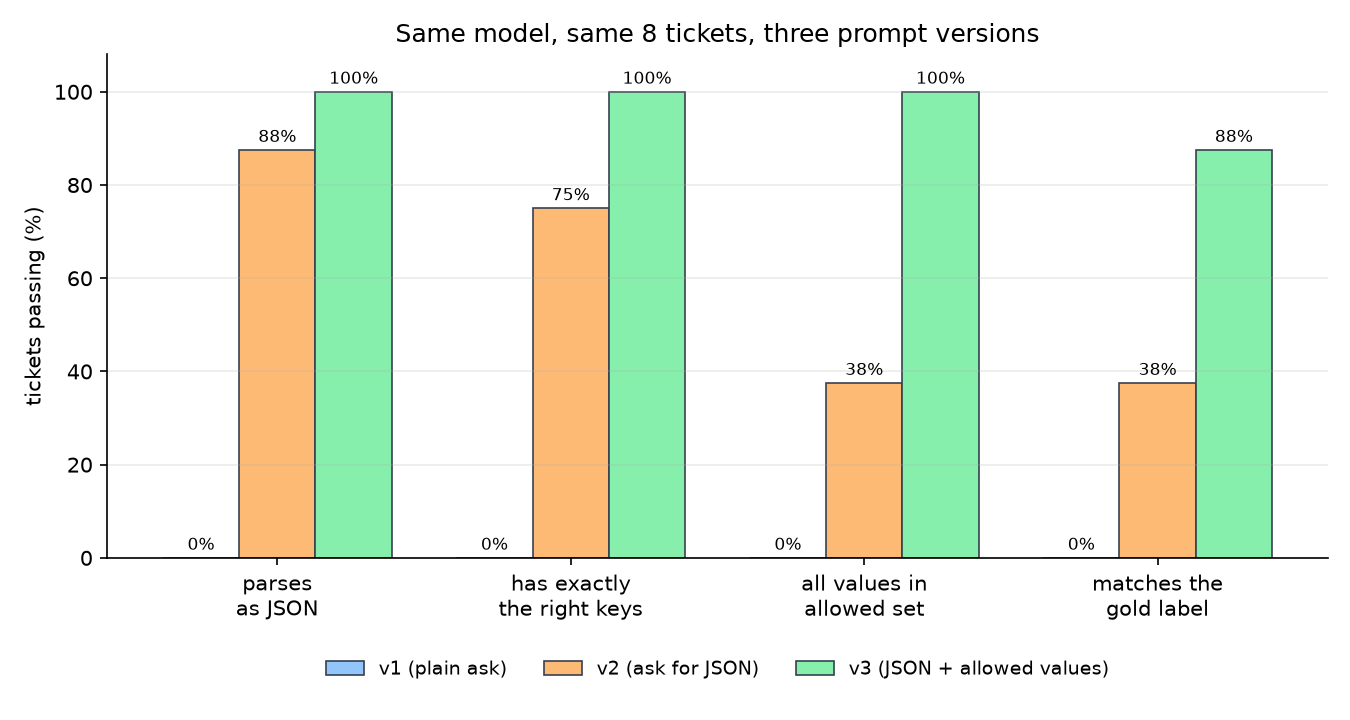
Same model. Same eight tickets. Nothing changed but the prompt, and structured correctness went from nothing to 88%.
The middle column is the interesting one. v2 asked for JSON and mostly got JSON: 88% of replies parsed. But only 38% had values your code could actually use.
Printing which check each failure died on turns the score into a to-do list. Abridged, the five v2 failures were:
| Died at | What came back | The defect |
|---|---|---|
parses | the JSON wrapped in a markdown code fence | fences are not JSON |
has_keys | a helpful extra "note" key | extra keys break callers |
valid_values | "category": "login" | invented a category |
valid_values | "urgency": "High" | capitalised, so not in the set |
valid_values | "refund_requested": "no" | a string where a boolean belongs |
Every one of those is fixed by naming the allowed values and forbidding code fences, which is exactly what v3 does. This is what the eval loop buys you: not “v3 feels better” but a list of five concrete defects and a measurement showing they are gone.
The one remaining v3 failure is worth keeping. It is a ticket where the model
said urgency low and the gold label said medium - a genuine judgement call
that two humans would also disagree on. That is your signal that either the
rubric needs to define urgency more sharply, or 88% is the real ceiling for this
label. Noticing the difference between a bug and a disagreement is a large part
of doing this well.
Step 5 - LLM-as-judge for what code cannot check
Code cannot tell you whether a summary is faithful. Ask a model, with a rubric, a small scale, and reasoning before the score.
JUDGE = """Does the summary contain only information present in the ticket?

Reply with two lines and nothing else:
reason: <one sentence>
verdict: pass or fail"""

def judge(ticket, summary):
    return ask(JUDGE, f"<ticket>{ticket}</ticket>\n<summary>{summary}</summary>")

t = "The driver left my food at the wrong door. I want my money back."
print(judge(t, "Customer reports a misdelivery and requests a refund."))
print("---")
print(judge(t, "Customer reports a misdelivery and requests a refund. "
               "This is their third complaint this month."))
reason: Every claim in the summary appears in the ticket.
verdict: pass
---
reason: The claim about a third complaint this month does not appear in the ticket.
verdict: failReason before verdict is not decoration. It makes the verdict more reliable, and it gives you something to read when you disagree with the judge.
Before you trust this in a pipeline, hand-label about thirty examples yourself and check how often the judge agrees with you. If agreement is poor, the rubric is the thing to fix, not the model. An unvalidated judge produces numbers that look like evidence and are not.
Key takeaways
- An LLM is one frozen model doing one trick, predicting the next token, and three training stages are what turned that trick into something that answers questions: pre-training for knowledge, SFT for behaviour, alignment for judgement.
- The prompt and its context window are your entire runtime interface, because the weights never change, which makes message ordering, examples, and caching engineering decisions rather than matters of taste.
- Benchmarks pick your shortlist and your own eval picks your model, and it is guardrails in code, not better prompt wording, that make the output safe to put in front of a user.
What to read next
If you are starting from zero and want the whole thing properly, go to the beginning of the ladder. Every post builds on the one before it.
→ Post 1.1 - What is a Neural Network?
If you came here for one of the seven parts, here is where each one gets the full treatment:
| This post covered | Go deeper in |
|---|---|
| Encoder, decoder, and why decoder-only won | Section 2, especially 2.6 and 2.7 |
| Pre-training, SFT, and scaling laws | Section 4 |
| RLHF, DPO, and Constitutional AI | Section 5 |
| Prompts, and prompt versioning | 7.1 and 11.1 |
| Context window and prompt caching | 2.10 and 7.2 |
| Grounding answers in your own documents | Section 8 (RAG) |
| Hallucinations and guardrails | 7.3 and 7.4 |
| Evals, benchmarks, and LLM-as-judge | Section 10 |
The full list is in the series index.